

Buy Grounded Hacks
Creature and material overlays for backyard exploration—insect markers, resource nodes, and Player Base ESP context.
At a glance
Grounded hack capabilities
What this package focuses on for Grounded before you open the full module list.
Plus 1 additional modules in the operator portal—see the full list below.
Overview
The main grounded hacks product
How this Grounded build fits missions, co-op missions, and missions matches after major patches.
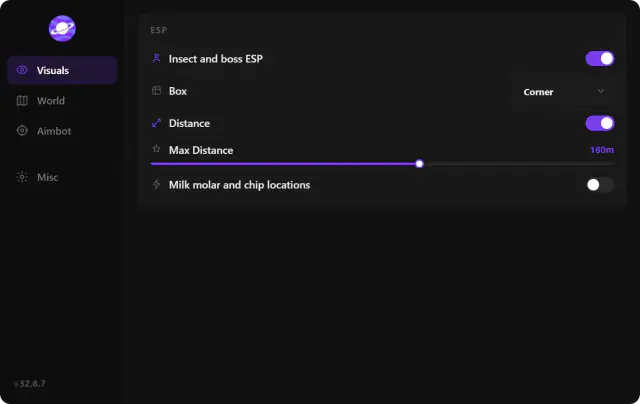
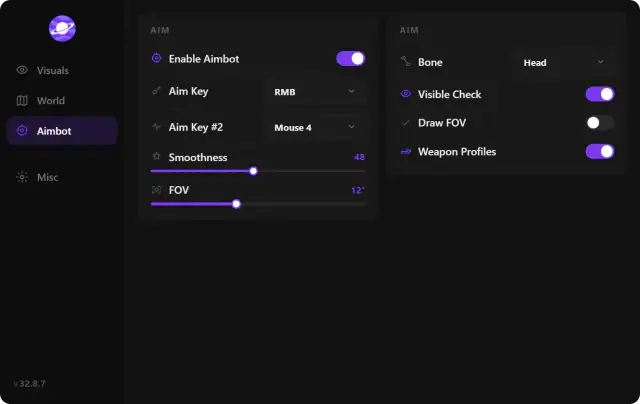
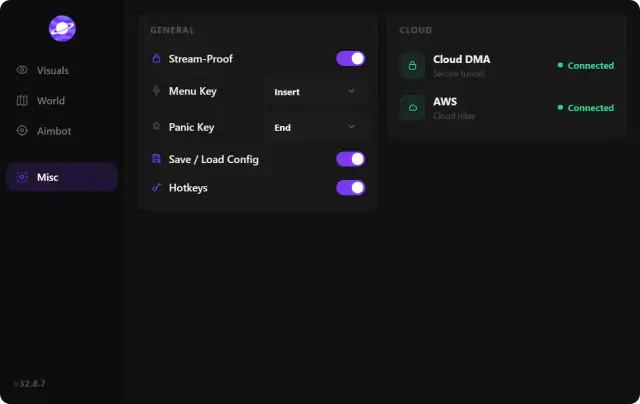
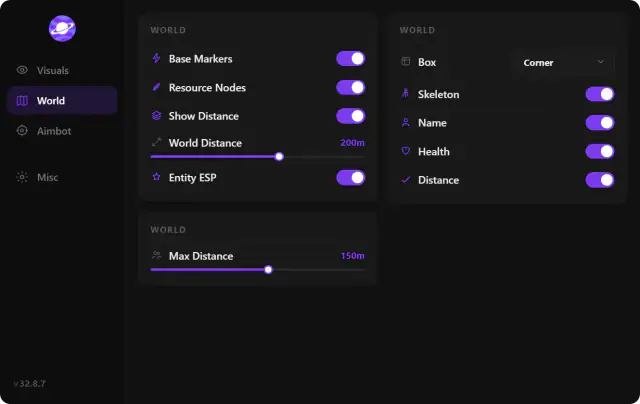
This is the main grounded hacks page. It covers Insect, Resource, Player Base ESP, Milk, Aim, and Stream-Proof Overlay. The pictures match the menu.
HWID Spoofer and Cloud DMA are separate. Check the status banner on groundedhacks.com before you pay.
The Grounded product on groundedhacks.com covers the six modules named on the partner sheet: Insect, Resource, Player Base ESP, Milk, Aim, and Stream-Proof Overlay. Screenshots and checkout links on this site point to the live partner listing.
Use modules conservatively
Third-party tools carry ban and report risk in co-op backyard sessions. Start with fewer toggles, short ESP range, and the status banner on groundedhacks.com before you queue. Support is available on Discord after checkout.
Listed modules
Insect, Resource, Player Base ESP, Milk, Aim, and Stream-Proof Overlay are the feature names published on this site. Confirm the live module list on the partner product page before purchase.
Availability
Check the homepage status banner and Discord #status after Grounded patches. Open a support ticket if the loader build does not match your client version.
Modules
What's included in ESP modules for Grounded
Every Grounded module and overlay listed with ESP modules—toggle and tune in the operator portal.
- Insect
- Resource
- Player Base ESP
- Milk
- Aim
- Stream-Proof Overlay
Experience
In the client · After you buy
Use the screenshots above for ESP modules—below is what each layer means and how access works after checkout.
In-game layers
- Layer A
Aim module
Combat assist during insect encounters.
- Layer B
Resource ESP
Material and pickup filters.
- Layer C
Visual options
Insect and Resource toggles.
- Layer D
Aim panel
Aim module configuration.
- Layer E
Milk & misc
Milk module and overlay options.
Guides
Grounded buy guides for ESP modules
Curated Grounded articles for setup, tuning, and patch-day checks that match this product.
Grounded hacks features: insect ESP, resource ESP, base marks, the Milk module, aim help, and a stream-proof overlay. Read this before you pay.
The main grounded hacks product includes insect ESP, item ESP, base marks, aim help, and stream-proof options. Compare them on groundedhacks.com for PC.
Grounded hacks can show ESP and aim help at the same time. Learn what each part does so you do not turn on too many options at once Read before you pay.
Grounded hacks on this site are for Steam on Windows 10 or 11. Update the game first, then match the loader build before you play Read before you pay.
Buy grounded hacks only on groundedhacks.com. Pick the product, pay on the partner page, then use the portal file. Skip random chat links For PC players.
Grounded hacks are extra tools for the tiny backyard game on Steam. This page explains ESP, aim help, and what groundedhacks.com lists For PC players.
FAQ
Questions about this page
Answers tied to what you are reading—visit the FAQ page for every topic.